From job card to invoice, without retyping.
Turn a job or appointment into an invoice with a single tap—sequentially numbered, as PDF and e-invoice. MotorMe chases overdue payments, and everything exports in a single file for your tax advisor.
Invoicing & tax
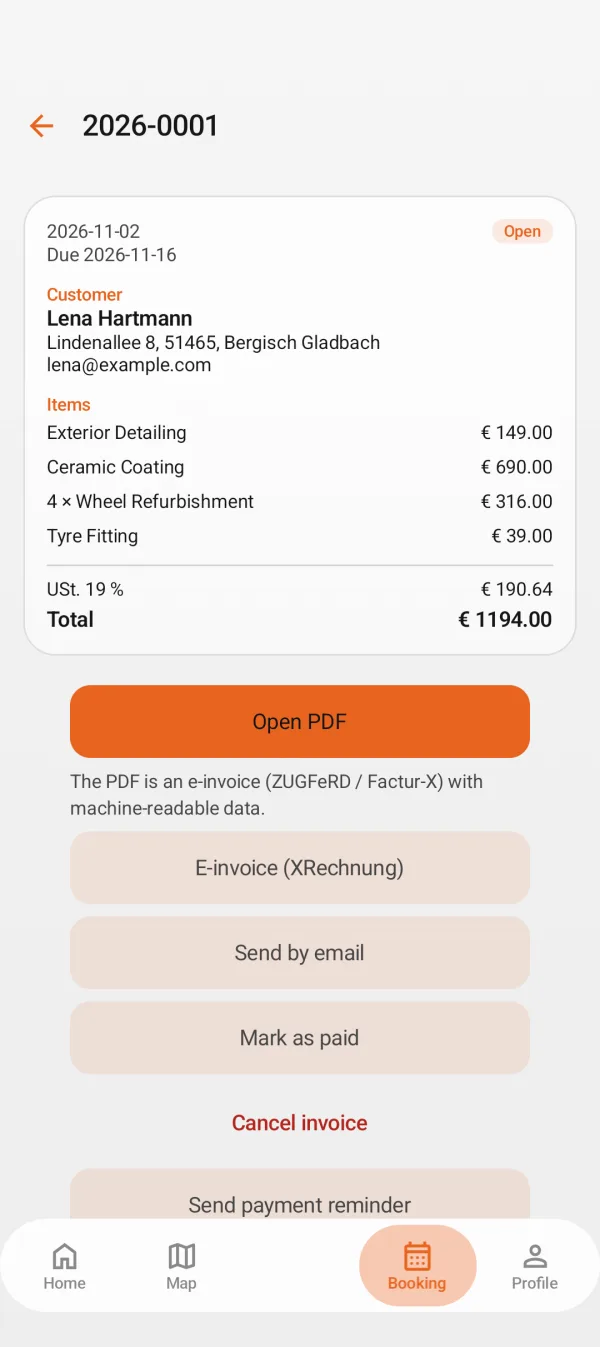
Create an invoice
Line items, parts, and labour times pull straight from the job.
- Sequential invoice numbering
- E-invoicing via ZUGFeRD, XRechnung for public contracts
- Send via link or PDF
Get paid
Keep track of outstanding invoices at a glance.
- Payment reminders and dunning notices
- Online deposit right at booking
- Redeem vouchers and promotions
Ready for your accountant
Select month, quarter, or year—your accountant receives everything in one file.
- Tax export as PDF, CSV, and DATEV
- Income and expenses with monthly profit and loss
- Invoice list and all PDFs included
FAQ
Does the invoice meet all legal requirements?
The invoice contains all standard mandatory details such as invoice number, date, tax rate, and your company details from your profile. Please review the settings once with your tax advisor.
Can I invoice under the small business tax exemption?
Yes. Simply select “tax-exempt (small business)” in your company profile.
Which plan do I need?
Invoicing, reminders, and tax exports are included in Pro.
More features
For drivers
For businesses
Less paperwork, more workshop time
MotorMe is launching soon. Message us and we'll let you know as soon as invoicing is ready.
Your email app opens with a message to us. Nothing else is sent.