Key register
Keys that don't disappear into a drawer.
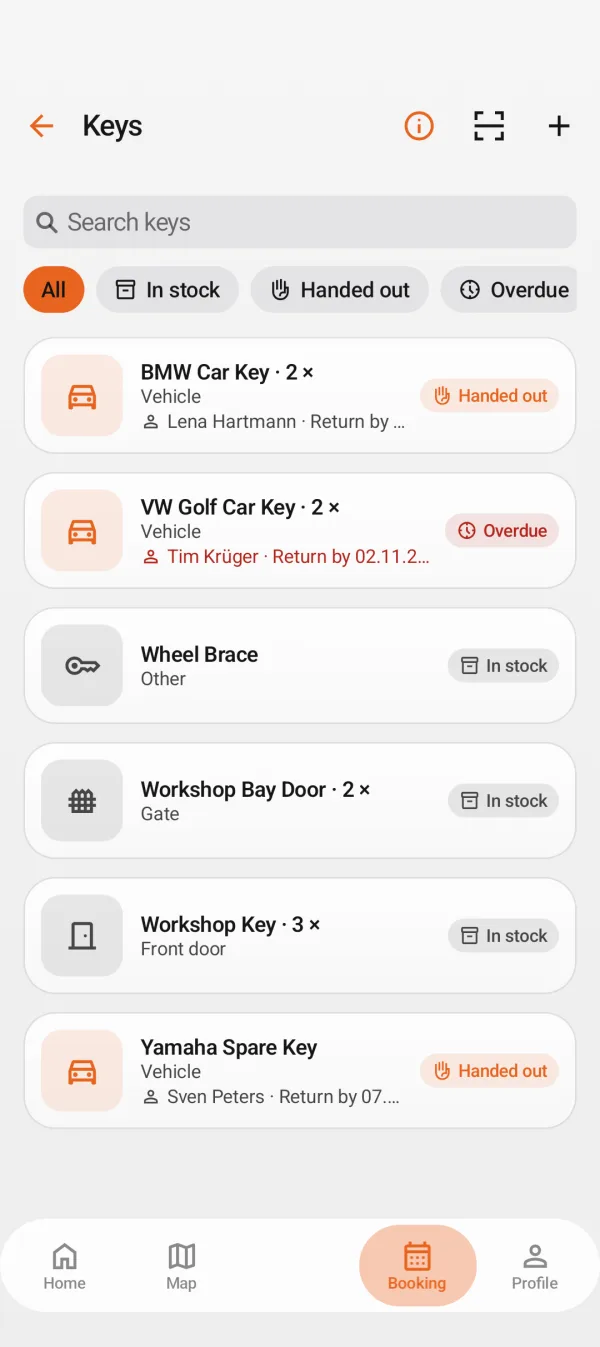
Every key set gets a number and a label. The key register shows who has it, since when, and until when—overdue and lost keys appear automatically.

How it works
Key register
Create and label
Assign keys to a vehicle and attach a QR label.
- Number and label for each key set
- Assignment to vehicle and customer
- Up to three photos per key set
Issue and return
Whoever receives a key signs right on the phone.
- Receipt as PDF
- Return deadline with reminder
- Traceable handovers within the team
Lost and found
Anyone who finds a lost key can scan the label and report it.
- Finder page without needing an app
- No address or license plate on the label
- Lost or found status in the register
FAQ
Is the license plate printed on the label?
No. The label only features a code. Finders report it via the finder page—the data stays strictly with the shop.
Can I also manage workshop keys?
Yes, including keys for rooms, shop vehicles, or spare keys.
Which plan do I need?
The key register is included in Pro.
More features
For drivers
For businesses
For BusinessesGet found, get booked, without commission.Free
Due DatesKnow who needs to book in next.Free
AI QuotesFrom damage photo to quote in minutes.Pro
Photo Check-inHandover with photos, zero disputes.Pro
Tyre HotelEvery wheel set in the right spot.Pro
Invoicing & taxFrom job card to invoice, without retyping.Pro
Team & planningWho does what, when, on which vehicle.Group
Launch
Every key in its place
MotorMe is launching soon. Drop us a line and we'll let you know as soon as the key register is ready.
Your email app opens with a message to us. Nothing else is sent.